Buildventory — operations for new-home builders
Drop your price sheet.
Watch your project come alive.
Buildventory reads the files you already have — price sheets, unit trackers, site plans — and turns them into a live availability board your team, your site, and your AI tools all work from.
Drag a sample in — or drop your own files.
Price sheets, unit trackers, site plans. Click a chip to play it.
The samples are real files — peek at the CSV · peek at the plan
Demo — sample files, parsed in your browser
One sheet in, a live board out.
Lot numbers, models, prices, statuses — read from the sheet you already keep, not re-typed into forms. Statuses normalize to one vocabulary (“Sold Firm” and “SOLD” are the same thing), prices stay prices, and everything below is the same table component your team will work in.
| Lot | Model | Sq. Ft. | Price | Status |
|---|---|---|---|---|
| 21 | Alder | 2,090 | $719,900 | Available |
| 23 | Cartwright | 2,610 | $848,900 | Hold |
| 25 | Denholm | 2,875 | $914,900 | Sold |
| 27 | Ellsworth | 3,120 | $979,900 | Available |
| 28 | Birchwood | 2,340 | $772,900 | Hold |
| 30 | Fernway | 1,480 | $632,900 | Available |
Sample data · Bramblewick Hollow (fictional)
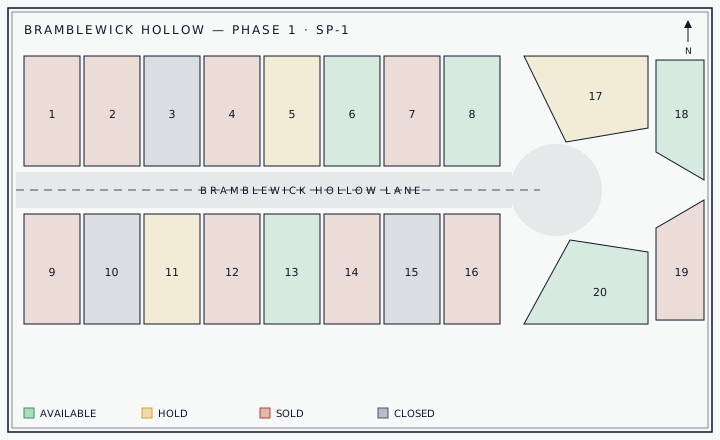
Your site plan becomes the interface.
Lots on the plan carry live status color. Hover one — this is the Bramblewick Hollow sample plan, and it’s already interactive. On the real surface, your plan binds to your units and updates as deals move.
Lot 06
Fernway
$602,900
Hover or tab through the plan. On the real surface this is your plan, bound to your units.
Your tools can drive it.
Every action in Buildventory is a named command behind one API — the same surface for your website, your scripts, and AI agents over MCP. Connect Claude with full or read-only access, revoke it any time, and nothing moves without landing in the activity log, labeled with who (or what) did it.
Illustration — how a session reads
You, to Claude
Put lot 23 on hold for the Harmons — they’re signing Thursday.
Claude runs
unit.hold { lot: "23", note: "Harmon — signing Thu" }
Activity
Every action — human, API, or AI — is a named command, and every command lands in the activity log with its actor. This isn’t a roadmap: commands like this one run through MCP today, you can grant an assistant read-only access instead, and you can revoke any connection from Settings.
Your files are the onboarding.
Play the sample above, or bring your own files — analyze them right now and walk out with a live project.